
choice takes an object of option to meaning
Each key is an option the model may return; each value says when that option applies. Two or more options.
One Jev API endpoint · Up to 4 questions per decision · Failed requests are never charged
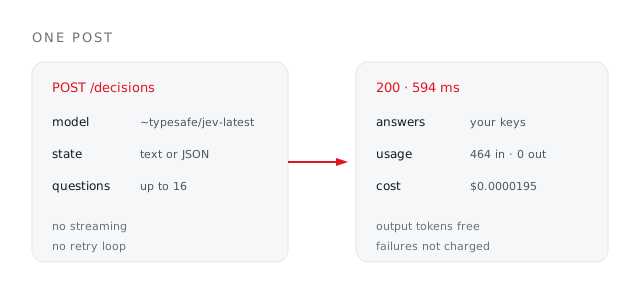
No streaming to buffer, no schema to coax, no retry loop. The Jev API returns the shape you asked for, with a probability on every option.
Send three things: the model, the state you want judged, and a map of named questions. Everything else the API knows, it learns from those. There is no session to open, no file to upload first, and no second call to collect a result — the answers arrive in the same response, typically in a few hundred milliseconds.
Use the floating alias to stay on the newest build, or pin a dated id when you need the answers to stay reproducible across a deploy.
The thing being judged. A plain string, a JSON object, or an array — whatever your pipeline already holds, with no reshaping step in between.
A map from your own question names to a type, plain-language instructions, and the criteria. Up to sixteen of them share one state; the first four share one 10-credit charge, each one after adds 2.
Copy this
Everything the endpoint needs, in one body. Paste it, swap the state for your own, and you have a working call.
curl https://jevx.org/api/decisions/run \
  -H 'Authorization: Bearer $JEVX_API_KEY' \
  -H 'Content-Type: application/json' \
  -d '{
    "state": "Order arrived late and crushed.",
    "questions": {
      "sentiment": {
        "type": "choice",
        "instructions": "Overall sentiment.",
        "criteria": {
          "positive": "Happy.",
          "negative": "Unhappy or angry."
        }
      }
    }
}'const res = await fetch(
'https://jevx.org/api/decisions/run',
{
method: 'POST',
headers: {
Authorization: `Bearer ${process.env.JEVX_API_KEY}`,
'Content-Type': 'application/json',
},
body: JSON.stringify({ state, questions }),
}
);
const { answers } = (await res.json()).data;
if (answers.sentiment.probabilities.negative > 0.8) {
await escalate(ticket);
}One round trip. No job id to poll, no webhook to stand up, and no second call to collect the result.
This is the one thing the Jev API is genuinely strict about, and the shapes below are the ones that actually validated against a live call — not a transcription of a doc. Get one wrong and the response is a deeply nested validation error whose only useful token is buried in a path array, so it is worth reading this section once rather than debugging it twice.
Each key is an option the model may return; each value says when that option applies. Two or more options.
Each entry is one step on the scale. The response echoes the scale back as a legend alongside the value.
Writing yes and no is the single most common mistake. The error that comes back points at criteria.true, which does not obviously mean rename your keys.
Omit it and the API returns an invalid-discriminator error listing the three it accepts. Instructions and criteria are required on all three.
Shapes that validate
Left is what the Jev API accepts. Right is what comes back when you guess — abbreviated, because the real thing is about a kilobyte of nested union failures.
// choice — object of option to meaning
"criteria": { "yes": "It applies.",
              "no":  "It does not." }

// noul — exactly the keys true and false
"criteria": { "true":  "It applies.",
              "false": "It does not." }

// score — ordered array, low to high
"criteria": [ "Low.", "Medium.", "High." ]// noul with yes/no
path: questions.x.criteria.true
→ expected string, received undefined
// score as an object
path: questions.x.criteria
→ expected array, received object
// missing type
path: questions.x.type
→ Invalid discriminator value.
Expected 'noul' | 'choice' | 'score'Jevx checks all three shapes before the request leaves your browser, so a malformed question costs you nothing.
A bare label is what every other model already gives you. What makes a Jev API response worth building on is the number beside it — branch on the probability, not just the winner, and you get a pipeline that knows when it is unsure.
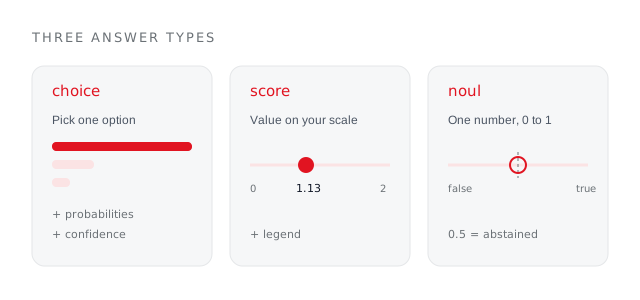
choice returns the option, score returns a number on your scale, noul returns a value between 0 and 1.
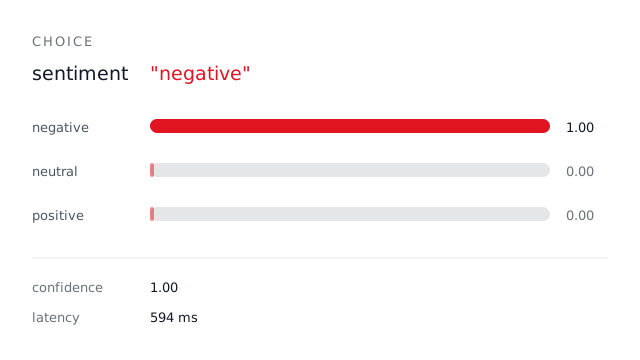
Every option carries its own odds. The gap between first and second is your real signal.
Act above it, escalate below it. Set it from what being wrong costs in that branch.
A noul of exactly 0.5 is the model declining. Give it a branch rather than rounding it.
MEASURED, NOT QUOTED
One live request on 2026-09-21: a short support ticket and three typed questions in a single call. These are the numbers that came back in the usage field, not an estimate.
Round trip
sent to parsed
Input tokens
state plus three questions
Output tokens
never billed
Per request
up to four questions
Straight out of the usage field the router returned on 2026-09-21.
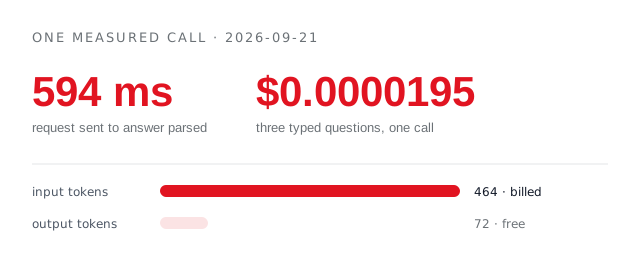
That is the state plus all three questions. Because output is never billed, the cheapest thing you can do is ask everything you need in one request rather than opening three.
See plansWhat developers hit in the first hour.
No. Jev is a decisions model and chat endpoints reject it outright. Decisions have their own route, and that is the only place the model answers.
Up to sixteen here. They share one state and one round trip; the first four share one 10-credit charge and each one after adds 2, so batching is both faster and cheaper than sending them one at a time.
It is the model's own estimate of being right about that answer, returned on the same call. Jev is as sharp as the options you hand it: give it choices that do not fit and it still has to pick one, and the confidence is what tells you that happened. Branch on the number, not just the label.
Yes, and it is one of the moves the API is best at. Take the results of a handful of tool calls, categorise them in one request, and hand the model that writes a short typed summary instead of the raw output. The whole round trip measured under a second.
API only. Jev is a closed model from TypeSafe, reached here through OpenRouter — nothing is downloaded and nothing runs on your machine.
Jev still picks one, and it tells you it was not sure. That is what the probabilities are for: a top option at 0.4 against a second at 0.35 is the model saying your option set does not cover this case. Set a floor and route everything under it somewhere else.
Build it in the playground, press the copy button on the result, and paste it straight into your codebase. Two free decisions with a new account, no card, and nothing is charged when a request fails.